Tactics in Intercept 2

Posted in Intercept, Scenarios on March 23, 2015 by Mr Backman
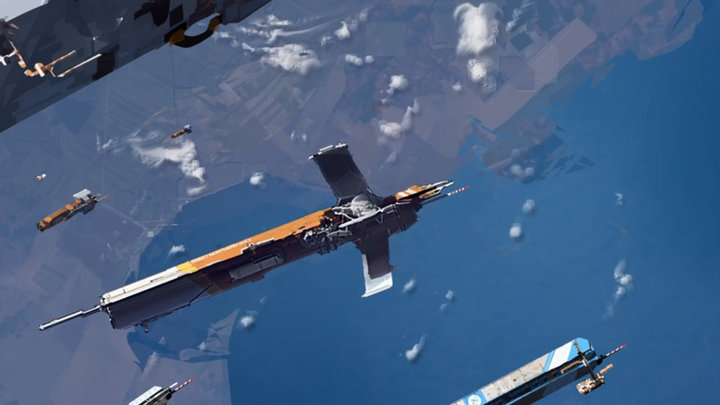
In orbit

The previous post on Tactics in Intercept dealt with the character skills of Ship and Fleet tactics. In this article we will talk about player tactics, how to play Intercept effectively.

Each scenario should have a clear objective for each side and the objective should never be ‘kill the enemy forces’. Real battles rarely work like that and they tend to be boring tests of ship capabilities with not many choices for the player to make. Instead, we want objectives where combat is a tool to realize them. Side A should land a ship on a planet, side B should stop them. Side A is escorting a trader from Earth to the moon and side B should stop them. Side A should take out an orbital station, side B should stop them etc

Intercept combat consist of two separate stages, before and after detection. Some scenarios may have one or both sides already detected but most of them will start double-blind.

Before detection
Spread your ships into separate boxes to avoid having them detected at the same time. If you have fission or fusion thrusting ships you must be really careful when to thrust, the fuel limit is one problem but the real killer with those drives is that you are almost guaranteed to become Tracked if they scan you when you thrust.

If you manage to stay undetected longer than your opponent you have an enormous advantage as you can see his moves before you do yours and your attacks will always go first. Beam attacks typically give away your position so it is important to not attack before you have a decent chance of hitting, but don’t wait too long, your opponent may have you detected and your advantage will have gained you nothing.

If you have cold start missiles launch a volley as soon as you got your opponent detected and have them drift closer him. Missile attacks does not automatically get you detected as beam attacks generally do.

After detection
Pay close attention to firing arcs and aft centerline. If you have more than one ship team them together to cover the wing mans cracks in his arcs, turning after thrusting really help here. Try to attack ships from the rear to hit the vulnerable thrust location and avoid hitting the hard to damage hull location. Concentrate firing on one ship until it is disabled as those pesky repair crews can revert minor damage in a jiffy.

If you think you might get attacked by missiles don’t use your lasers for attack. Lasers used to attack cannot later be used against missiles. Missiles are deadly in Intercept, don’t let them hit you. Facing towards the attacker increases the chance of hull hits and lessens the risk of vulnerable thrust hits, roll to bring any dorsal mounts to bear.

Always have the scenario objective in mind. Fighting is dangerous so avoid it if you can, and remember the motto of Space rouge pilots: “Keep the solar wind to your backside”.

Merry Christmas

Posted in Intercept on December 24, 2013 by Mr Backman

Vector_XMas

Nothing new here. except a tiny update to the rulebook clarifying the Planet LOS rules. Anyhow, merry midvinterblot which is what this fine holiday was originally called, before it was stolen by you-know-who.

Update 2013-12-09

Posted in Intercept on December 10, 2013 by Mr Backman

Planet LOS in Star Wars

The  Design system has been updated so that headings for SA (Surface area), Volume and Power turn red if the values become too large (too much surface area for the hull, too much volume for the hull, not enough power to run all components). Note that any components with power use value in Bold must be handled while playing as they are optional to the ships running; weapons and the various fuel converters are examples. Note also that weapons can operate with less than full power allocated with DMs from the Underpower table, the gun is sinply firing at a lower rate of fire reducing power draw and hit propability.

The Subsidized merchant actually has its power heading in red because it cannot run its Floater and Floorfield at the same time, yeah pretty crummy those subs but they are definitely the cheapest merchants per hauled cargo.

The rulebook has gotten a better movement example and the section on Planet LOS has been rewritten to simplify and clarify 2013-12-09

Subsidized merchant DataCard

Posted in Design system, Intercept, Rules with tags , , , , on December 1, 2013 by Mr Backman
Image courtesy of mr Ian Stead http://biomassart.wordpress.com/

Image courtesy of mr Ian Stead http://biomassart.wordpress.com/

“What a piece of junk!” – Luke Skywalker
“You came in that thing? You’re braver than I thought.” – Leia to Han 
“Would it help if I got out and pushed?” – Leia to Han
“It might!” – Han to Leia
“She’s the fastest hunk of junk in the galaxy.” – Lando Calrissian

Subsidized merchant DataCard

I have updated the DataCard and Intercept rulebook, get ’em while they’re hot, at the downloads page 2013-12-01

The design system holds everything there is to know about your ship but to use it for an Intercept space battle you need to fill in its DataCard. The DataCard holds all data crucial to space battles where the Ship.xls hold everything there is to know about the design. Print out DataCard.pdf and fill in your designs. We will use the Subsidized merchant as worked examples on how to fill in the DataCard. There is a ready-made Subsidized merchant and Launch document in the Designs.zip and eventually I’ll fill out the rest of my designs. OK, let’s get on with the worked example shall we. The little thumbnail above is the entire DataCard but I will break it down into pieces a comment on each part s it gets filled in. As always, go to the downloads page to look for the latest version of everything – the rules, the design system and sometimes also the DataCard may all get updates now and then.

DataCard1

First we write the ships name at the top left of the DataCard. To the right of the name we see some rows of checkboxes. The one labeled Turns can be ignored as it is used by the Deterministic optional rules indicating how many steps of turn the ship has for each of the four turns. The row labeled AB Initiative side A check the odd boxes and side B check the even boxes. These are used for tie breaking Initiative. The lowest row of boxes labeled Frac thrust is where you check the turns where your fractional thrust gives you an extra G. Look up Fractional thrust in the rule book for details, our Subsidized merchant happens to have  no decimal thrust when loaded or unloaded so we leave them unchecked.

DataCard2

To the right is a box for Size; +8 for our example. This is the target number for all Pilot rolls (and a Tactician rolls too, however unlikely in a Subsidized merchant).The Comp# box should hold your computers model number. Make sure there is room for the computer dice pool. These can can be used to improve all Pilot, Tactician, Attack, Defense, Sensors or Repair roll by rolling one or more dice from the pool and picking the two highest D6, every four turns the computer dice pool is replenished by the current Model #. We write 1: for our Model-1 computer. To the right of that are four boxes were we write the beam to-hit numbers for 1, 3 and 10 squares range and the missile to-hit value, all taking our ships Size into account. Look up the numbers and subtract Size to get your ships target numbers. These are the base numbers your enemy roll against to hit your ship. We write 4+, 7+, 10+ and 6+ respectively.

Write your ships Thrust Gs (Loaded/Unloaded)  in the Thrust box.  The last box in the top row, the Fuel box, holds how many GTurns worth of fuel the ship has, loaded/unloaded. The box is large enough for you to tick off fuel use when playing. Only ships with Fission or Fusion thrusters have this value, Impulse drives expend no fuel when thrusting and neither does a Floater, our ship write 10/20: here. Yes, the sub is known for its extremely low delta-V, that old-timer who belittled the sub crews has obviously never flown one as their low delta-V requires careful planning and experience.

DataCard3

The next row should hold the ships Streamlining type; Open frame, Normal, Streamlined or Airframe, also add the areobrake damage modifier for speed here. The name of the streamlining should be entered but also the damage modifier for speed which is important when doing areobrakes or landing. The damage per speed modifiers is from the areobrake table in the rulebook, in the section on planets.

  • Open frame The ISS or other irregular structures. +6/1 speed but you shouldn’t really do any areobraking with these. If you areobrake facing is off by two or more your first speed brake will be treated as Open frame. Hulls with Critical damage are always treated as Open frame.
  • Normal A car or a subsonic aircraft. +3/1 speed. If you areobrake facing is off by one your first speed brake will be trated as Normal unless it is Open frame. Hulls with Severe damage are always treated as Normal or worse.
  • Streamlined A jetfighter or the space shuttle. +1/1 speed. This is the minimum streamlining for reasonably safe areobrakes and atmosphere landings. Hulls with Light damage are always treated as Streamlined or worse.
  • Airframe The SR-71 or other extremely streamlined hypersonic designs. +1/3 speed. Areobrakes and atmosphere landings are safe unless your facing is off or brake more than your frame can handle.

We write Streamlined +1/1 and 7% 1 for the percentage of wings an extra areobrake (1 for every full 5%). Wings is only used for aerobraking in Intercept but may be more important in roleplaying situations, especially for the Subsidized merchant.

DataCard4

Below this there’s a large box where all the ships Signatures should be entered. If your battle takes place where the Sun factor is not +6 you should enter the actual value to get properly modified Signatures. Remember that if the Sun factor is, say +5 you should subtract 5 from Visual(Hull) when the ship is in the Shadow column, instead of the usual 6. Note the Sun factor at the top of your map sheet as a reminder.

DataCard5

The box with the ship status check boxes can be ignored as they are only used in-game to indicate status changes, I’ll show you their picture anyway.

DataCard6

Below that there are some boxes for the Sensitivity of your sensors. We enter -1 for our Optical (Visual/IR) and -5 for our small radar. Note that radar Scans are the only ones using any significant amounts of power.

DataCard7

To the right of this we have the crew box where the numbers and special notes of our crew are entered. We write 1 Pilot, 1 Astrogator, (2) Sensor ops, 3 Gunners and 2 Techs. The parenthesis around the Sensor ops value indicate that Gunners and Sensor ops serve dual roles; if any attacks or defense-rolls were made in a turn we get -2 on our Scan factor as the same crew members were doing both tasks.

DataCard9

To the right of this there’s the hit location box where damage, continuing damage, jury rig repairs and frozen watch revival is tracked. There are also check boxes for the current location of the repair crew. Enter the ARM and DAB values for you design here. The Subsidized merchant has these values: Hull +20 ARM +25 DAB Surface +15/+17 ARM +19 DAB Crew +20 ARM +22 DAB Payload +20 ARM +22 DAB Power +20 ARM +22 DAB Thrust +17 ARM +19 DAB The Surface part has 4 check box rows for Top/Front, Left, Right and Bottom/Rear and should be applied damage based on what facing the attk came from. The Power part may have two values; the left for full power and the left when Silent running, only ships with vulnerable radiators have two values there.

The column of check boxes labeled RC tells the current location of your Repair Crew. Check its location whenever it moves to a new location,Repair Crew takes the same damage when that location is hit. To the right of the RC column there is one labeled JR which stands for Jury Rig. Jury Rigged locations are treated as having one level less damage for damage effects purposes.

The check boxes labeled L, S, C and D are used for the damage level of a location and they stand for Light, Severe, Critical and Destroyed. Damage to an already damaged location work like this:

  • New damage level is higher Replace the old damage with the new, uncheck JR but CD remains.
  • New damage level is equal Add one damage level, uncheck JR but CD remains.
  • New damage level is lower Keep the old damage level, uncheck JR but CD remains.

The CD column stands for Continuing Damage which is damage that may get worse over time, like fires and the like. A hit gets Continuing Damage if the Damage roll turned up as a 6. Each turn, after repairs and if repairs failed, roll a D6 per CD; 1 and the CD is removed of itself, 2-4 has no effect and 5-6 increases damage one level. If a non-Hull location gets Destroyed from CD remove the CD there and add a CD to the Hull location, even if the Hull is completely undamaged. A Destroyed Hull, as you can imagine, destroys the ship. Yes, a tiny hit in the Surface location can, with lots of sheer luck, eventually destroy the entire ship.

DataCard10

The three boxes labeled Volley A – C are used to note endurance expenditure for missiles with longer endurance than one turn. If more than 3 volleys are in flight at the same time simply note this on a separate piece of paper. Below all is the area for weapons and mounts.

DataCard13

The right part holds the number and types of various weapon. Sand casters, Meson screen and Nuclear dampers write their ARM values in the PEN column and missiles treat the Range column as the controller range. Our Subsidized merchant has two sand-casters, two lasers and two missile launchers, one for each of the two large turrets mounted  Left and Right.

The right part holds the mounts of the ship and their respective locations. Our ship has 2 Large Turrets mounted on the left and right, each with one Sand-caster, one 10 MW laser and one Small missile launcher.

It should be self-evident how this work for your own designs. Note that different missiles can have different parameters and a ship may carry more than one kind so all variants should be noted so somewhere and each volley clearly noted what type it holds. A single volley can only hold one type of missiles but the launcher can choose which type it launches, even from a magazine.

Well, that is all folks. Look at the Lauch values and see if you understand how that design is put together. Note that the Small turret mounted on top is NOT standard issue but a modification done for my daughters Launch and can be a pretty nasty surprise to anyone believening that the Launch of a Subsidized merchant is harmless.